
Website Planning
What Is INP? Core Web Vitals and Website Responsiveness Explained
Weps Technologies · 21/11/2026 · Updated 21/11/2026
Learn what Interaction to Next Paint (INP) measures, why 200 ms matters, how to test slow website buttons and what to ask your developer.
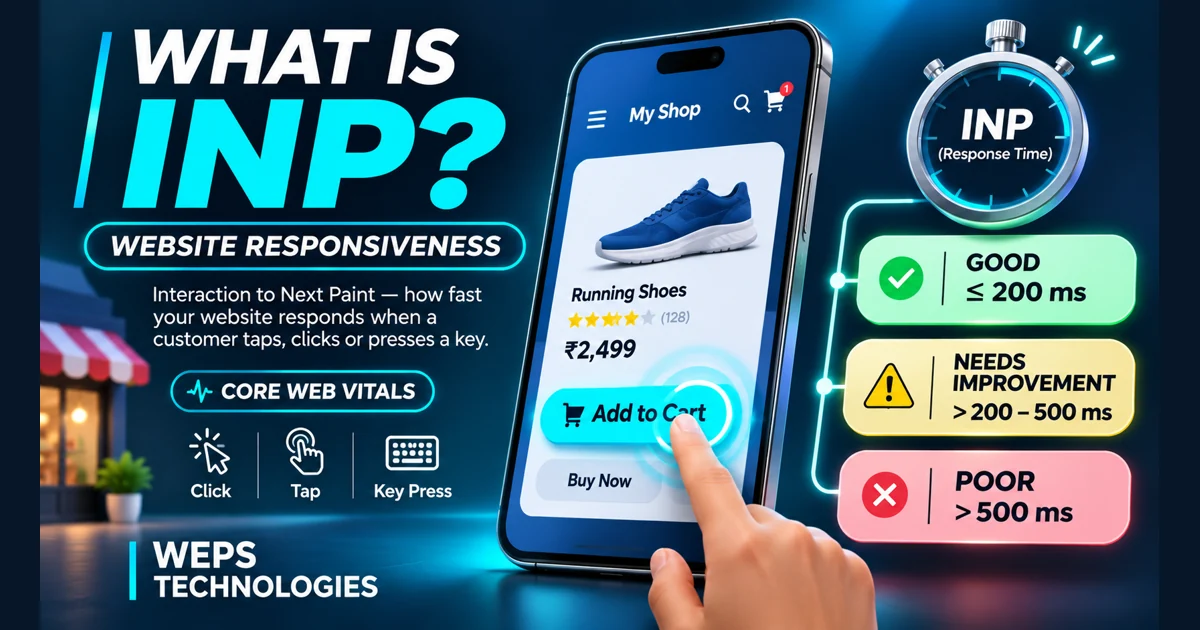
Interaction to Next Paint (INP) is a Core Web Vital that measures how responsive a web page is to clicks, taps and keyboard interactions. A good INP is 200 milliseconds or less; above 200 ms through 500 ms needs improvement, and above 500 ms is poor. These thresholds are assessed at the 75th percentile of eligible real-user page visits, separately for mobile and desktop. [1]
Imagine an online shopper tapping Add to Cart and seeing nothing happen. The website might have loaded quickly, yet the shopping experience still feels slow. INP helps diagnose that distinction. This guide shows shop owners and small-business teams how to read the numbers, reproduce slow actions, and ask developers for evidence of improvement.
What does INP actually measure?
An interaction passes through three stages before the browser can display its next frame:
| Stage | Plain-English meaning | Example |
|---|---|---|
| Input delay | Waiting for the browser to start handling a tap | A script is occupying the main thread. |
| Processing duration | Running the code triggered by the action | Updating a shopping cart or filtering products. |
| Presentation delay | Preparing and displaying the next frame | Recalculating layout and drawing updated content. |
A simple illustrative interaction might spend 80 ms waiting, 70 ms processing and 40 ms presenting. The overall interaction latency would be 190 ms. This is an illustration, not a measured WEPS project or a site-wide INP result. [2]
INP observes eligible interactions across the page visit, including those made while the page is still loading. It normally represents the slowest qualifying interaction; on visits with many interactions, the calculation can disregard unusually slow outliers (one highest interaction for every 50). It is not an average of all button clicks. [1]
An important distinction: INP ends at the next paint, not necessarily when a payment, booking or API request finishes. A responsive interface can show a pending state promptly while the server processes the request. The business must still measure whether the underlying operation completes correctly.
What is a good INP score?
| Field INP (75th percentile) | Rating | What to do |
|---|---|---|
| 200 ms or less | Good | Monitor important flows and prevent regressions. |
| More than 200 ms, up to 500 ms | Needs improvement | Identify slow interactions and prioritize frequent actions. |
| More than 500 ms | Poor | Investigate blocking code and rendering delays as a priority. |
Two hundred milliseconds is one fifth of a second. A mobile p75 value of 180 ms means roughly three quarters of measured eligible visits were at or below 180 ms; it does not mean every visitor or button responds that quickly. The field sample excludes visits for which an interaction metric cannot be collected. [1]
Which actions count?
Clicks, touchscreen taps and keyboard presses can contribute to INP. Scrolling, hovering and zooming on their own do not. A visit during which no qualifying interaction occurs can have no INP measurement. Lack of data is not proof of a fast or slow website.
INP vs LCP vs CLS: the three Core Web Vitals
| Metric | What it tells a business owner | Good threshold |
|---|---|---|
| LCP (Largest Contentful Paint) | When the main visible content appears | 2.5 seconds or less |
| INP (Interaction to Next Paint) | How promptly the page responds to input | 200 ms or less |
| CLS (Cumulative Layout Shift) | Whether visible content moves unexpectedly | 0.1 or less |
The metrics describe different aspects of experience. A page with a fast hero image may still have a slow product filter. A responsive checkout can still have a layout shift that moves a button underneath the shopper's finger. Check all three metrics rather than treating the Lighthouse score as the complete picture. [3]
For more on loading performance, read our guide to a good LCP score.
INP became a Core Web Vital on 12 March 2024, replacing First Input Delay (FID). FID only tracked the waiting portion of the first interaction. INP looks across the visit and includes processing and presentation. [4]
Why website responsiveness matters for shops
The following are hypothetical examples, not client case studies or measured outcomes.
Example 1: A sweet shop with online orders
A customer taps the plus button to increase a quantity. The cart count stays unchanged for a moment, so the customer taps repeatedly. A responsive implementation should update the quantity visibly, while the ordering system independently prevents accidental duplicate transactions. Improving INP alone does not guarantee correct order handling.
Example 2: A clothing catalogue with filters
A shopper selects a size filter and the list becomes unresponsive. The developer can investigate whether large amounts of JavaScript or unnecessary re-rendering are blocking the page, then test the same product list on a modest Android device.
Example 3: A salon or clinic booking page
The visitor presses Book now while a chat widget and tracking tools initialize. The button appears unresponsive. Review when scripts run, make the form react promptly, and show accurate confirmation only after the booking is actually accepted. Never send customer health information to performance analytics.
Example 4: A local business enquiry form
A customer submits a quote request and receives no feedback. Immediate visual acknowledgement, an accessible pending state, and a clear success or error message help prevent confusion. Measure the visible response separately from the time needed to deliver the lead.
How to check your website's INP
1. Use PageSpeed Insights for real-world data
Open PageSpeed Insights, enter an important public page URL, and select mobile. Look for INP in the real-user experience section. Repeat for desktop. Record the date, URL, device segment and whether the result refers to the URL or the entire origin (website). The field results use Chrome UX Report (CrUX) data over a rolling 28-day period. [5]
If there is not sufficient page-level data, the tool may show origin-level results or no field result. Do not substitute an origin value and describe it as the exact score of a checkout page.
2. Review Google Search Console
Open the Core Web Vitals report for your verified property. Review mobile and desktop separately, noting affected groups and representative pages. Groups can help prioritize investigation, but they are not an individual trace of a slow button. Use the report to discover patterns and validate fixes when enough field data is available.
3. Reproduce the customer journey
Test on a lower-end or mid-range phone and on desktop. Open a fresh page, use the menu, search products, filter a category, add an item, and submit a test form in a safe environment. Repeat when the page is loading and after it settles. Note the precise action, device, browser, network conditions and visible symptom. Do not place a real order unnecessarily.
4. Ask a developer for a trace
Chrome DevTools Performance recordings can help identify a slow individual interaction. Ask for a trace and a comparison after the fix. A standard Lighthouse navigation audit does not perform the full set of real customer interactions; Total Blocking Time (TBT) can be a useful lab diagnostic, but it is not a replacement for field INP. [2, 6]
Why is my INP slow, and how can developers improve it?
| Symptom | Possible cause to investigate | Potential fix to evaluate |
|---|---|---|
| Menu responds late during startup | Scripts monopolize the main thread | Remove unnecessary work and defer non-essential scripts. |
| Product filter freezes | Expensive event callbacks | Break work into smaller tasks; simplify filtering and rendering. |
| Cart changes appear late | Large layout or paint costs | Reduce DOM complexity and avoid repetitive layout work. |
| Booking appears stuck | No immediate pending feedback, or a slow request | Paint honest progress promptly; measure API completion separately. |
| Only older phones struggle | CPU or memory constraints | Test representative hardware and reduce JavaScript and UI work. |
These are hypotheses, not diagnoses. The developer should reproduce the issue before selecting a fix. For code-level investigation, see web.dev's INP optimization guide. Avoid installing a generic performance plugin without checking whether it introduces additional scripts or breaks shopping flows.
If you are choosing a new site, read our template versus custom website guide. Either approach can perform well or poorly depending on implementation.
A practical responsiveness test checklist for shop owners
Use this worksheet with your developer. Mark each action as Pass, Investigate, Not applicable or Not tested. A subjective pass is not a measured field INP pass.
| Action | Expected behavior | Evidence to collect |
|---|---|---|
| Open navigation | Menu responds without a visible freeze | Device, trace, screenshot |
| Search products | Input remains responsive; results update correctly | Search interaction trace |
| Change size or category | Selected filter is visible; list is correct | Trace and functional test |
| Add to cart / change quantity | Accurate feedback, no unintended duplicates | Test cart and trace |
| Book or submit an enquiry | Pending, success and error states are clear | Staging test and API outcome |
| Call / WhatsApp | Correct link opens; no unnecessary blocking | Real-device test |
| Keyboard navigation | Focus remains visible and controls work | Keyboard accessibility check |
Capture before-and-after evidence using the same device, test steps and comparable conditions. Monitor field data after deployment as the collection window rolls forward. A passing local run is not a promise that every visitor will have the same result.
Six questions to ask your website developer
- What is our mobile and desktop p75 INP, and is it URL-level, origin-level or unavailable?
- Which interaction is slow, and which of the three latency stages dominates?
- Can you show the trace and explain the code or third-party script responsible?
- What will you change, and which checkout, navigation and accessibility tests must still pass?
- What are the before-and-after results under comparable test conditions?
- Who will monitor field performance and investigate regressions after future releases?
When commissioning a new website, record these deliverables in your proposal. Our website quotation checklist explains how to define testing, acceptance and support before signing a contract.
Does improving INP help Google rankings or sales?
Core Web Vitals are used by Google's ranking systems, but relevance and other signals also matter. Good INP is not a guarantee of a top search result, more traffic or a particular increase in sales. [3, 7]
Treat responsiveness as a customer experience goal. Track successful form submissions, completed orders and errors separately from website speed; do not assume that a change in conversion rate was caused by INP alone.
Frequently asked questions
What does INP stand for?
Interaction to Next Paint. It is the Core Web Vital for responsiveness to qualifying user input.
Is a 200 ms INP good?
Yes. The good field threshold includes 200 ms. Values greater than 200 ms and no more than 500 ms need improvement.
Is INP the same as page load speed?
No. INP concerns interactions throughout a visit. LCP concerns when the largest eligible visible content element appears.
Why is there no INP in PageSpeed Insights?
There may be insufficient eligible field data for the page or origin. Visits with no qualifying interactions cannot produce an INP measurement. Test representative interactions locally while gathering field evidence.
Can hosting alone fix slow INP?
Not necessarily. Better hosting may improve network or server latency, but browser-side JavaScript and rendering can still delay interaction feedback. Diagnose the bottleneck first. For what hosting does and does not include, see what is included in website hosting and a domain in the first year.
Can I fix INP without changing my entire website?
Often a targeted fix is sufficient, such as unloading an unnecessary widget or simplifying a slow filter. Confirm with traces and functional regression tests before committing to a rebuild.
How long does it take for field INP to improve?
PageSpeed Insights field results use a rolling 28-day sample. New visits gradually replace older ones; local testing may show changes sooner. Actual field improvement depends on traffic and implementation.
Talk to WEPS Technologies about a more responsive website
If customers report slow menus, filters, booking forms or shopping buttons, tell us which page and action cause trouble. Share the public URL, device type and any available performance report. Our website design and development service can help define a suitable scope for your business website. Use the contact page or WhatsApp +91 97193 25253. Please do not share passwords, customer records or payment details.
We do not guarantee search positions, speed scores or business results without evidence and a defined scope.
Sources and further reading
- web.dev — Interaction to Next Paint
- web.dev — Optimize INP
- Google Search Central — Core Web Vitals
- web.dev — INP becomes a Core Web Vital on March 12
- Google — About PageSpeed Insights
- web.dev — Diagnose slow interactions in the lab
- Google Search Central — Page experience
Reviewed against public documentation on 21 November 2026. Examples are hypothetical; no WEPS website or client INP measurement is claimed.